Our own build · For a friend
A one-tap tracker we built for a friend, on Cloudflare
A friend has been logging a daily habit in a text file since February 2025. One line per entry, rounded to the nearest quarter hour, 6,900 lines by the time he asked us about it. He wanted something on his phone he could tap. We built it in an evening: one Cloudflare Worker, one D1 table, Cloudflare Access for the login, and a manifest so it sits on the home screen like an app. It is small, and it is the same pattern we use for client tools.

The ask
The text file was already a good spec
The file had a header per day and one time per line, newest day first. That is a data model. The ask on top of it was short: open from the phone, see the current time already rounded to the quarter hour, press once. Make the time adjustable for the times he forgets and comes back an hour later. Put the logger front and center, and some charts and the day's list under it.
So we kept his model exactly. The database stores a day and a time as the same strings he was typing. The import was a 40-line Python script that read 621 days and wrote 3,792 inserts. The export writes the same layout back out, so nothing he built up over twenty months is stuck in our app.
########################################################################
Oct 31, 2026
########################################################################

10:30 AM
12:00 PM
 1:45 PM
 3:30 PM
 5:30 PM
 7:00 PM
What it does
Logger first, everything else underneath
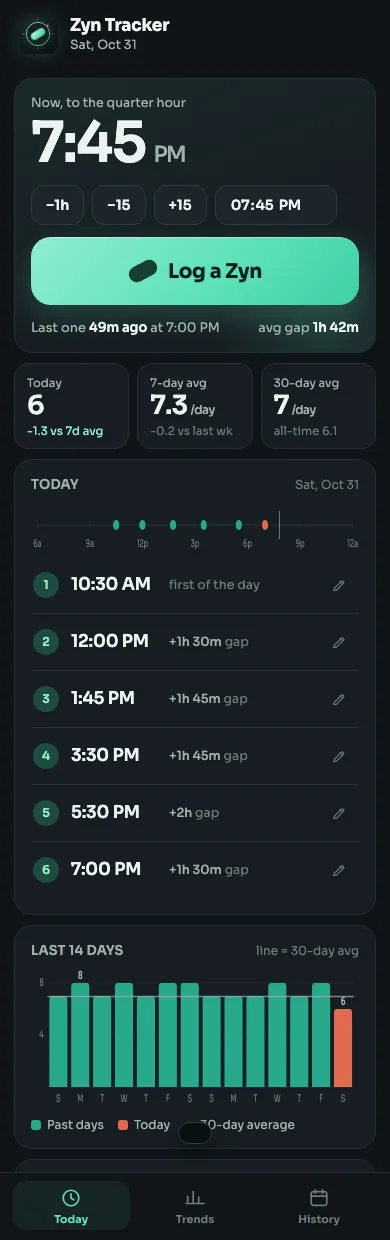
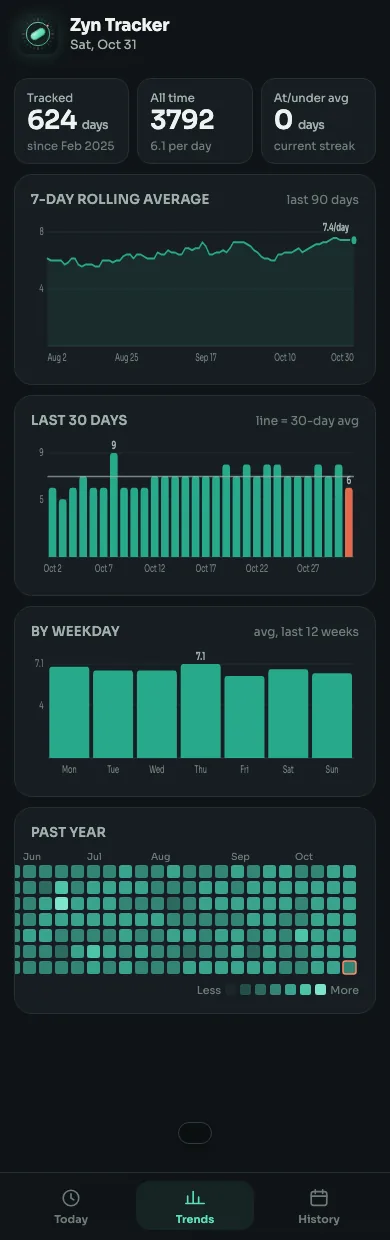
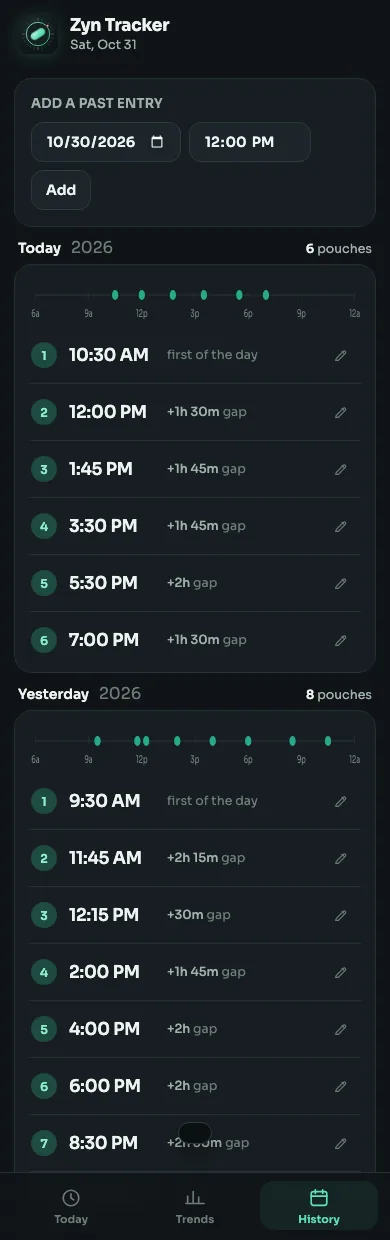
Every log shows a toast with Undo. If the request fails, the entry waits in localStorage and goes up the next time the app is opened with a connection. Picking a time later than now is read as last night, which is the usual reason to pick one.
How it's built
One hostname, one Worker, one table
A tap on the icon goes through four things. Cloudflare Access handles the login before the request reaches our code, and the Worker checks the token again anyway, so the data is safe even if someone reaches the script another way.
- Home screen icon Safari "Add to Home Screen". A manifest and a service worker make it open full screen, offline if it has to.
- Cloudflare Access Sits in front of the hostname. One Google account allowed, session set to a month, so the phone rarely asks again.
- Worker Serves the page, the assets and a small JSON API. Re-checks the Access token on every request, about fifty lines with WebCrypto.
- D1 One SQLite table: day, time, source, note. Times stay as the local strings the friend already used. No timezone math.
The same picture with everything in it. Three zones: the phone, the Cloudflare account, and the laptop that deploys. Blue is the authenticated app traffic, brick is the offline retry path, and the sky outline marks where login happens.
- hosting
- Cloudflare Worker on a custom domain
- login
- Cloudflare Access, Google, one email
- storage
- D1, one table, 3,792 rows imported
- front end
- One HTML shell, vanilla JS, hand-rolled SVG charts
- offline
- Service worker for the shell, localStorage queue for writes
- icon
- One SVG, rendered to PNG with macOS QuickLook
- export
- /export.txt rebuilds the original text file
- time to ship
- One evening, with Claude Code
Setting it up
Four commands and one API call
The hosted Cloudflare MCP is read-only, so anything that creates infrastructure runs through wrangler or curl with a scoped token. The database, the Access app, the Worker and its custom domain all came from the terminal. Nothing was clicked together in a dashboard, which means the whole setup is in the repo's README and can be done again.
# the database and its one table
npx wrangler d1 create zyn-tracker
npx wrangler d1 execute zyn-tracker --remote --file=schema.sql

# the Access app: one POST to /accounts/:id/access/apps
# with the hostname, the Google IdP, a 730h session and a
# policy allowing one email. The response carries the
# audience the Worker verifies against.

# the Worker, bound to the custom domain.
# wrangler creates the DNS record.
npx wrangler deploy

# the icon: QuickLook renders, ImageMagick only resizes
qlmanage -t -s 1024 -o out/ src/assets/icon.svg
magick out/icon.svg.png -resize 512x512 src/assets/icon-512.png
What we'd keep
Decisions that paid for themselves the same day
Day headers, one time per line, nearest quarter hour. Keeping that exact model meant the import was a 40-line script and the export is lossless.
Cloudflare Access took one API call to set up and handles Google, sessions and cookies. We did not write a login form, a session store or a password reset.
The Today and Trends tabs render from a single /api/stats call: the day, the last 30 days of entries, 53 weeks of daily counts. Averages and the heatmap are computed in the browser.
Day and time are local wall-clock strings chosen by the phone. The server validates the shape and nothing else, so midnight and travel do not shift anything.
What cost time
Four things worth knowing before you start
Every request came back "internal error". Local mode with a local D1 copy of the data was instant and fine.
Under wrangler dev the request URL says the custom domain, so a "skip auth on localhost" check never fires. The bypass keys off a value in the gitignored .dev.vars instead.
Its built-in SVG renderer drops gradients and filters. QuickLook (qlmanage) renders it right; ImageMagick only does the resizing.
Looking up the hostname before the DNS record existed cached a negative answer locally. curl --resolve got around it; phones never saw it.
The data
Hand-kept logs have typos, so we audited before we imported
A two-minute pass over the file found four day headers typed twice, each sitting next to a day that was missing, and five first-of-the-day times typed as PM that came before noon entries. Three of the duplicated headers were plainly the next day and got moved; the PM times became AM. One duplicated day had no missing neighbour, so we left it merged and told him. The fixes live in a SQL file next to the import, so the history of the data is reproducible.
- 621 days read
- 3,792 entries kept
- 3 exact duplicates dropped
- 8 corrections, recorded
The stack
- Cloudflare Workers (TypeScript)
- D1 (SQLite)
- Cloudflare Access + Google
- Web app manifest + service worker
- Vanilla JS, SVG charts
- wrangler
- Claude Code
Have a small thing that should be an app?
A spreadsheet, a text file, a form someone fills in twice a day. This is the size of tool we build in an evening and keep running for years.